

Make a Word report
A template is a normal Word document with a few places marked for information to fill in. You decide how the document looks; ISE Reporting supplies the customer name, amounts, and other details.
Try it here
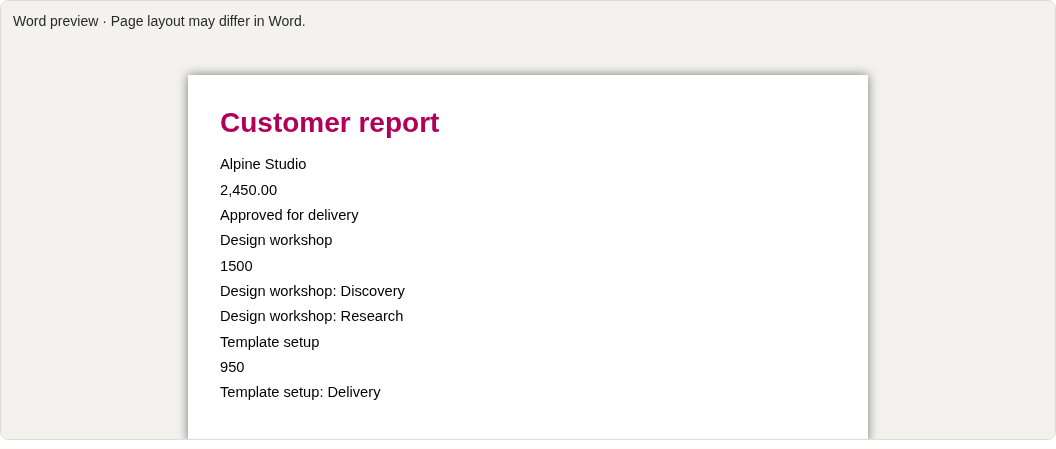
Section titled “Try it here”Edit the JSON data, then edit the template and its reporting bindings directly below. The Live preview beside the template updates automatically as data and template edits change. The customer name and line items appear in the finished document. Download it to see the full layout in Word.
Fill a Word report
Open full example ↗Three useful building blocks
Section titled “Three useful building blocks”- A field fills in a value, such as a customer name.
- A repeating section includes one copy for each line item. Add another item to the sample data to see it grow.
- A condition shows content only when it is needed. Set
Approvedtofalsein the data to hide the approval message.
For your own templates, the browser editor and Word add-in help you choose fields without remembering their names. A field description (called a schema) tells it which values are available. Your colleague or application can supply this file.
Use your own template
Section titled “Use your own template”Download the sample, edit its layout in Word, and save it under a new name. Open the saved file in the DOCX editor to try your own template. Keep its bound fields and field description attached. Your original file is never overwritten.
The browser preview is a quick check. Word is the place to check page breaks, headers, and final printing. If the report cannot be filled, keep your edits, read the message, and try again after correcting the field or data.